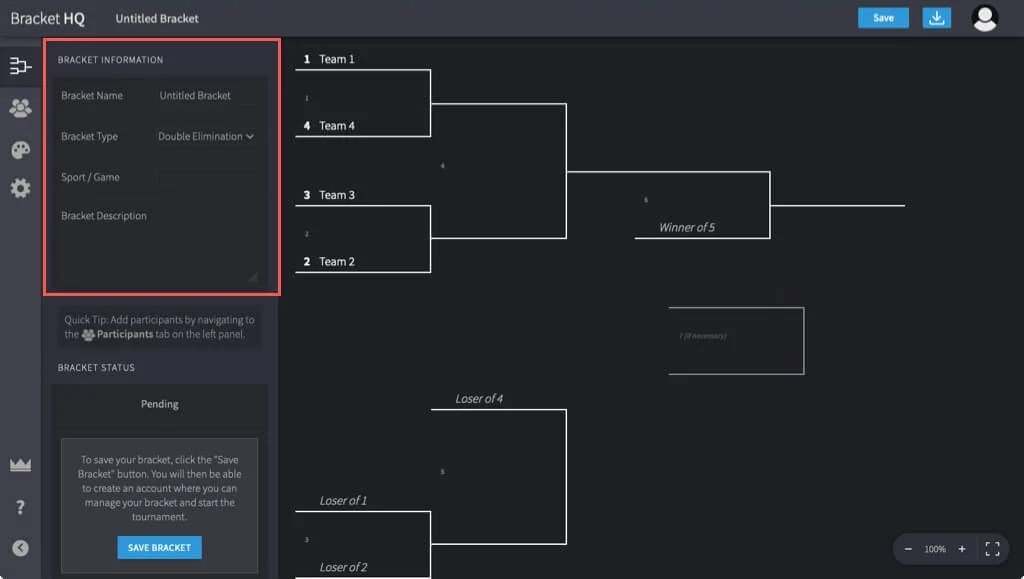
Tired of drawing shaky lines and crossing out names on a notepad for your next tournament? Whether you're wrangling a fantasy football league, orchestrating an esports showdown, or just planning a casual game night with friends, a perfectly structured bracket is your secret weapon. This Step-by-Step Guide to Using Free Online Bracket Generators will show you how to ditch the pen and paper and create professional, shareable tournament brackets in minutes, not hours.
Think of it as having a digital tournament director at your fingertips – instant setup, easy tracking, and a clean design that makes everyone feel like a pro. Ready to transform your competition from chaotic to champion-ready? Let's dive in.
At a Glance: Your Quick Start Guide
- Pick Your Play Style: Choose between single elimination (fastest), double elimination (fairer), or round robin (best for leagues).
- List Your Teams: Manually type names or upload a simple Excel/CSV file for bulk entry.
- Personalize It: Add a tournament name, decide on seeding, and pick a bracket style.
- Click & Confirm: Generate your bracket and review the matchups instantly.
- Share & Track: Download as a PDF (for printing), Excel (for tracking scores), or an Image (for social media).
Why Brackets Matter: Beyond Just a Draw
From the nail-biting finishes of March Madness to the strategic depth of esports circuits, brackets are the backbone of competitive play. They bring structure, fairness, and a clear path to victory, igniting the spirit of competition in any group. But let's be honest, manually creating a robust bracket for more than a handful of participants can quickly become a tangled mess of eraser marks and crossed-out names. That's where free online bracket generators step in – democratizing tournament management for everyone.
These intuitive tools take the headache out of organization, allowing you to focus on the thrill of the game itself. No more worrying about seeding, byes, or formatting; the generator handles the heavy lifting, giving you a polished, professional outcome every time. You'll quickly discover how easy it is to generate your brackets for free and elevate any competition.
Demystifying the Digital Draw: What Exactly Are These Tools?
At their core, free online bracket generators are web-based applications designed to automatically create visual tournament brackets based on your input. Imagine the precision of a computer program combined with the flexibility to handle various competition formats, participant counts, and even custom styling.
Tools like ScoreLeader's Bracket Maker and Brakto's free Bracket Generator exemplify this convenience. They allow you to select a format, add your contenders, and instantly produce a structured bracket ready for download or sharing. These platforms aren't just about drawing lines; they're comprehensive systems that can even help track progress, wins, losses, and round advancements, making them invaluable for organizers of all stripes.
Your Game Plan: How to Use Free Online Bracket Generators Step by Step
Ready to build your masterpiece? Here's the precise path to creating your perfect tournament bracket with a free online generator.
Step 1: Laying the Groundwork – Picking Your Tournament Format
This is your foundational decision, dictating the flow and duration of your competition. Most generators offer three primary formats, each with distinct advantages:
- Single Elimination (Knockout): This is the speed demon of tournament formats. One loss, and a participant is out.
- Why choose it? Ideal for events with limited time, large participant pools, or when you want quick, decisive outcomes. Think casual gaming tournaments, quick office challenges, or sports playoffs. It’s exciting because every match is high-stakes.
- Considerations: One bad day can end a strong team's run, which some might find less fair.
- Double Elimination: Offering a safety net, this format gives teams a second chance. Participants move into a "loser's bracket" after their first loss, allowing them to fight their way back to the grand finals.
- Why choose it? Perfect for competitive play where fairness and skill demonstration are paramount. Common in esports, fighting game tournaments, or more serious sports leagues where you want to ensure the best team truly wins.
- Considerations: Takes significantly longer than single elimination due to more matches.
- Round Robin: Here, every participant plays against every other participant at least once.
- Why choose it? Best for leagues, small tournaments, or competitions where you want to determine overall standings rather than a single champion. Excellent for building camaraderie and ensuring everyone gets plenty of play time.
- Considerations: Can be very time-consuming for large participant numbers. A 6-team round robin, for example, requires 15 matches (n*(n-1)/2).
- Making Your Choice: Think about your event's goals. Is it about speed, fairness, or participation? This will guide you to the right format.
Step 2: Gathering Your Contenders – Adding Participants
Once your format is set, it's time to populate your bracket with the stars of the show. Online generators offer flexible ways to input your participant list:
- Manual Entry: For smaller tournaments (say, 2-8 participants), simply type each name directly into the designated fields. This is straightforward and quick for a short list.
- Excel/CSV Upload (Bulk Entry): This is where the magic happens for larger events. Most generators provide an option to upload a spreadsheet (.xlsx or .csv file).
- How to prepare your file: Create a simple spreadsheet. In Column A, list each participant's name, one name per row. Ensure there are no empty rows or special characters that could confuse the system. Many generators will even provide a downloadable template to ensure proper formatting.
- Why use it? Saves immense time and prevents typos when dealing with dozens or even hundreds of participants.
- Tip for Success: Always double-check your participant list for accuracy before proceeding. A misspelled name or missing participant can throw a wrench into your carefully planned event.
Step 3: Tailoring Your Tournament – Customization Options (Optional, but Recommended)
While generators make instant brackets, the customization features allow you to truly make it your own. Don't skip these steps!
- Naming Your Event: Add a custom Tournament Name. This could be "Annual Office Trivia Challenge," "Summer Esports Showdown," or "Family Board Game Blitz." A clear title makes your bracket professional and easily identifiable.
- Seeding: Fair Play vs. Random Fun:
- Automatic Seeding: If you have ranked participants (e.g., top-ranked players, previous champions), some generators allow you to input their seed numbers, ensuring higher-ranked teams face off later in the tournament. The generator will then strategically place them to avoid early upsets among top contenders.
- Randomize Matchups: For casual events or when you want completely unbiased matchups, select this option. The generator will randomly assign positions, adding an element of surprise to the initial draw.
- Bracket Styles: A Touch of Personalization: Depending on the generator, you might be able to choose between standard bracket layouts, or custom styles that add a bit of flair or specific visual elements to your design. This can be as simple as changing colors or font styles to match your event's branding.
- Understanding "Byes": The Unsung Heroes of Uneven Teams:
- You might have noticed that many tournament brackets are designed for participant numbers that are powers of 2 (4, 8, 16, 32, etc.). What happens if you have 6, 10, or 20 participants?
- Online generators automatically handle this by adding "Byes." A bye means a participant automatically advances to the next round without playing an initial match. This ensures the bracket remains balanced. For example, if you have 6 participants for an 8-team single-elimination bracket, the system will automatically add 2 byes, usually giving the top-seeded (or randomly chosen) teams a pass into the second round.
- Key takeaway: Don't worry if your participant count isn't a perfect power of 2; the generator will adjust gracefully.
Step 4: The Big Reveal – Generating Your Bracket
With all your choices locked in, this is the exciting part!
- Click "Generate Bracket": With a single click, the generator will process your inputs and instantly display your complete tournament bracket on screen.
- Review the Structure and Matchups: Take a moment to visually inspect the bracket. Are the matchups as you expected? Does the flow look correct? This is your last chance for a quick check before downloading. For instance, if you enabled seeding, verify that top seeds aren't colliding in the first round.
Step 5: Your Bracket, Your Way – Downloading and Sharing
Your beautifully organized bracket is ready! Now it's time to get it into the hands of your participants. Most generators offer multiple download formats to suit various needs:
- PDF (Portable Document Format): Print-Ready Perfection
- Best for: Printing, sharing a static, uneditable version via email, or displaying on a screen. PDFs maintain consistent formatting across all devices, ensuring everyone sees the bracket exactly as you created it. It's the go-to for official printouts.
- Excel (Spreadsheet Format): For the Trackers and Tweakers
- Best for: If you plan to manually track scores, update winners, or make further edits after the initial download, Excel is your best friend. This format allows you full control over the data and layout, letting you customize it further or use it for scorekeeping. For dynamic tournament management, the Excel option is invaluable, allowing you to update results as they happen.
- Image (JPEG/PNG): Social Media Savvy
- Best for: Quickly sharing your bracket on social media platforms, websites, or messaging apps. An image file is instantly viewable and perfect for announcements or generating excitement.
- Sharing via Link: Platforms like ScoreLeader offer the convenience of a unique shareable link. This means you don't even need to download; just copy the link and send it to participants. They can view the bracket directly in their browser, and you can often update results manually through your organizer dashboard, keeping the live link always current. This dynamic sharing capability is a huge benefit, especially for ongoing tournaments.
Beyond Generation: Managing Your Tournament with Ease
A free online bracket generator isn't just about the initial setup; it's about simplifying the entire tournament journey. Once you've created and shared your bracket, many platforms offer functionalities to help you manage the ongoing competition.
For example, ScoreLeader's Bracket Maker excels in this area. After initial creation, you can continue to track wins, losses, rounds, and even tie-breakers directly within the system. When a match concludes, you simply update the results manually, and the bracket automatically reflects the advancements. This streamlines the process of communicating progress to all participants, ensuring everyone stays informed and engaged. It's truly a comprehensive tool for both generating and overseeing your event, allowing you to easily generate and manage your brackets.
Common Hurdles & Smart Solutions: Troubleshooting Your Bracket
Even with the most intuitive tools, a minor hiccup can occur. Here’s how to quickly overcome common challenges:
- "My bulk upload isn't working!"
- Solution: Double-check your Excel or CSV file. Ensure all participant names are in Column A, one per row. Crucially, remove any empty rows, extra columns, or special characters that might confuse the uploader. Sometimes, an extra space or an emoji can cause issues. If a template was provided, stick to it rigorously.
- "Why does my bracket look incorrect or have strange gaps?"
- Solution: Verify that your participant count matches the selected tournament format. Remember that byes are automatically added for participant counts that aren't a power of 2 (e.g., 6 participants for an 8-team bracket will show 2 byes). This is normal and ensures a balanced structure. If it still looks off, check if you accidentally entered duplicate names or an incorrect format choice.
- "My downloads are failing or not starting."
- Solution: Most often, this is due to browser settings.
- Enable Pop-ups: Ensure that pop-ups are enabled for the bracket generator website (e.g., brakto.com or scoreleader.com) in your browser settings. Many download functions trigger a new tab or window.
- Check Browser Download Settings: Look for a blocked download notification in your browser's address bar or check your general download preferences.
- Try a Different Browser: Sometimes, a browser-specific extension or setting can interfere; trying a different browser can quickly diagnose this.
- "I need to edit my bracket after I've already downloaded it."
- Solution: If you anticipate needing to make changes post-download (like correcting a misspelled name, swapping participants, or manually entering scores), always download the Excel format. This spreadsheet is fully editable, allowing you to tweak details without needing to regenerate the entire bracket. PDFs and Image files are static and not easily modifiable.
- "I want to track progress, but the downloaded PDF is static."
- Solution: Use the Excel download for dynamic tracking, or leverage the platform's native tracking features, as offered by ScoreLeader. When you generate a bracket online, many tools offer a dynamic view via a shared link, allowing you to update results as the tournament unfolds.
Choosing the Right Generator for Your Needs
While many free online bracket generators offer similar core functionalities, subtle differences can make one a better fit for your specific needs.
- ScoreLeader's Bracket Maker, for instance, is praised for its clean, professional design and comprehensive features that go beyond just creation. It emphasizes ease of tracking and sharing, making it highly adaptable for everything from esports leagues to academic competitions or even office challenges. Its ability to update results via a unique shareable link offers a more dynamic experience.
- Brakto's free Bracket Generator focuses on speed and simplicity, promising to create professional brackets in seconds. Its direct download options (PDF, Excel) are ideal for those who want a quick, print-ready or editable file without needing ongoing online management.
Consider what matters most to your event: instant gratification, advanced tracking, specific design needs, or a blend of everything. Many of these tools are flexible enough to cater to a wide range of competition sizes and types, ensuring you'll find a solution that fits. Ultimately, the best way to determine which one suits you is to simply try it out. The beauty of free online tools is the ability to experiment without commitment.
The Final Whistle: Your Tournament Awaits!
Congratulations! You're now equipped with the knowledge to navigate the world of free online bracket generators like a seasoned pro. Gone are the days of manual, error-prone bracket creation. With just a few clicks, you can design, populate, and share professional-grade tournament structures that elevate any competition.
From picking the perfect format to leveraging advanced customization and troubleshooting common issues, you have a clear roadmap. So go ahead, unleash your inner tournament organizer, rally your participants, and get ready for some exhilarating competition. Your flawlessly structured bracket is just a few clicks away, ready to bring order and excitement to your next event. Ready to get started? Generate your brackets for free and let the games begin!